 Employee Benefits
 HR & Compliance
 Technology
 Wellness
 PEO Solutions
You're in renewal season, the inbox is full of carrier decks, and someone on the leadership team just asked why benefits got so complicated. That's the employee benefits design problem, not the glossy version. The job isn't to pile on more plans, it's to make hard trade-offs between cost, coverage, choice, and admin load without turning open enrollment into a mess.
A good design process starts with discipline. It asks what the package has to do for the business, what the workforce needs, and how much operational complexity the team can realistically carry. If you skip that, you end up paying for options nobody understands, while HR spends weeks cleaning up payroll errors and carrier feeds.
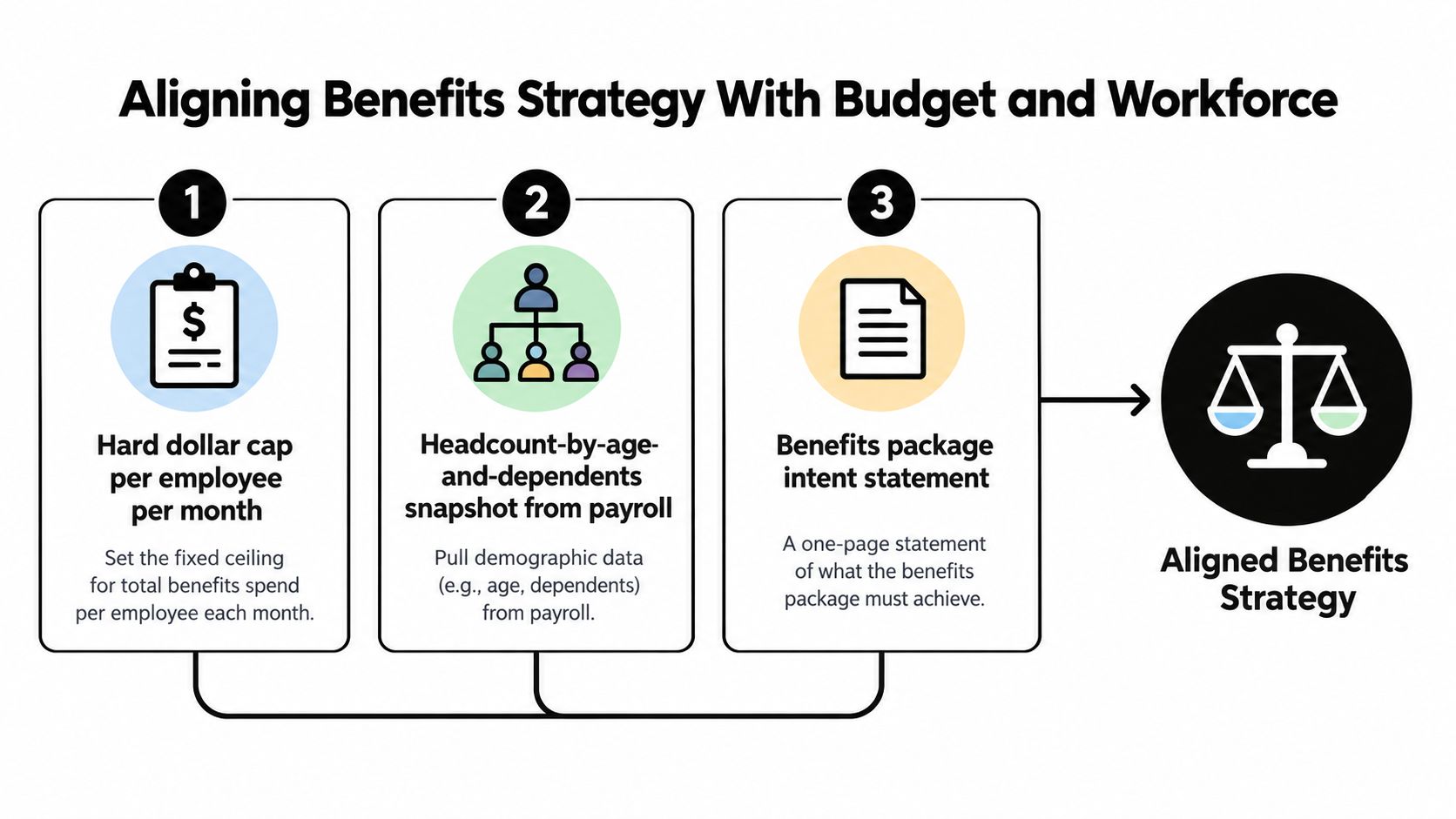
Table of Contents
- What Employee Benefits Design Actually Means Today
- Aligning Benefits Strategy With Budget and Workforce
- Choosing the Right Plan Structure for Your Company
- Benchmarking Carriers and Shopping the Market
- Configuring Enrollment and Administration Workflows
- Designing for Personalization Without Creating Chaos
- Compliance, Pitfalls, and Your Next-Step Checklist
What Employee Benefits Design Actually Means Today
Employee benefits design used to be a loose mix of company goodwill and whatever a carrier could sell. That's not how it works now. The history matters because benefits evolved from early employer welfare support into structured packages, with milestones like American Express's first private pension plan in 1875 and the Granite Cutters Union health plan in 1877 showing the shift from ad hoc help to formal benefits architecture SHRM history of benefits evolution.
The real definition
Today, employee benefits design means choosing the mix of plans, vendors, rules, and workflows that fits your budget and workforce without flooding employees with choices they can't evaluate. It's not a wish list of products. It's a set of trade-offs.
That's why the old habit of stacking more carriers and more voluntary products usually fails small and mid-sized employers. Every extra line adds reconciliation work, more files, more confusion, and more decisions pushed onto employees who don't have the data to judge them well. The result is predictable, higher admin burden and weaker enrollment quality.
Practical rule: If a benefit doesn't improve retention, recruiting, or risk control, it's usually just adding noise.
A better operator's view starts with six moving parts, strategy alignment, plan structure selection, carrier benchmarking, enrollment configuration, personalization controls, and compliance. That framework keeps you from treating benefits like a shopping exercise. It forces you to ask whether the package is actually doing a job.
If you're trying to simplify the company side of the equation, start with a clean overview of benefits for companies. That's the right lens when you're deciding what belongs in the program and what should stay out.
Aligning Benefits Strategy With Budget and Workforce
The first mistake I see is budget first, but without context. A hard cap matters, but it can't sit alone. You need three inputs before you touch a carrier: a hard dollar cap per employee per month, a headcount snapshot by age and dependents, and a one-page statement of what the package must achieve for recruiting and retention.
Write the philosophy before the budget gets negotiated away
A benefits philosophy is the answer to what kind of employer you want to be. The budget is the ceiling. If you write the budget first and the philosophy second, every conversation becomes a defense of cost instead of a design decision.
A 90-person professional services firm with a younger workforce, a meaningful share of employees with children, and a fixed monthly ceiling should usually lean toward a strong EPO and generous parental leave rather than chasing a low-deductible PPO plus a pile of fringe perks. That's not about being cheap. It's about funding the benefits the workforce will feel.
The common trap is benchmarking total spend without normalizing for workforce composition. A company with younger employees, fewer dependents, and lower claims exposure is not comparable to a company with older families and heavier utilization. If you compare them as if they were the same, you'll draw the wrong conclusion and buy the wrong plan.
Direct advice: Put the demographics on paper before you compare any quote. Otherwise the spreadsheet lies to you.
If you're pressure-testing what this means for employer spend, benefits cost for employers is a useful place to anchor the conversation in practical terms. Keep that conversation tied to workforce reality, not abstract wishful thinking.
Choosing the Right Plan Structure for Your Company
Most teams get lazy. They ask for quotes before they decide which structure makes sense. That's backward. The structure sets the economics, the cash-flow risk, and how much control you really have.
Compare the four options that actually matter
Fully insured buys certainty. You know the premium, the carrier carries the claim risk, and the admin load is lighter. The trade-off is blunt, higher unit cost and limited room to customize.
Self-funded gives you the most control and, over time, can be the lowest-cost path. But it also makes you responsible for claim volatility, stop-loss protection, and a vendor stack that a small HR team can manage. If your team can't handle the paperwork, don't pretend it's a strategic win.
Level-funded sits in the middle and usually fits employers that want some cost predictability without jumping straight into full self-funding. It can work well when claims are relatively stable and the company is large enough to absorb some variance.
PEO co-employment is a packaging choice as much as a benefits choice. It can simplify payroll, compliance, and benefits administration, but it also reduces control and can lock the company into arrangements that are hard to unwind.
| Structure | Best Headcount Range | Cost Profile | Admin Burden | Key Risk |
|---|---|---|---|---|
| Fully insured | Under 25 | Higher unit cost, more predictable cash flow | Low | Less customization |
| PEO | Under 25, and sometimes 25 to 100 | Bundled pricing, less transparent | Low to moderate | Co-employment lock-in |
| Level-funded | 25 to 150 | Middle ground, can improve with stable claims | Moderate | Claims volatility if assumptions miss |
| Self-funded | 100 to 250 | Highest potential efficiency over time | High | Stop-loss and claim risk |
The decision rule is simple. Under 25 employees, fully insured or PEO usually wins. From 25 to 100, level-funded or PEO is often the cleanest path. From 100 to 250, self-funded becomes a real option if the cash position and stop-loss terms support it.
Benchmarking Carriers and Shopping the Market
Benchmarking is not about collecting a mountain of quotes and picking the cheapest line on page two. It's about forcing carriers to price the same design, on the same terms, against a target you've already defined. If you don't do that, the carrier is designing the plan for you, and that's how companies end up with bloated benefits that look competitive but don't function well.
Start with public reference points
Use public data to anchor the conversation. CMS Medical Loss Ratio data tells you how carriers are behaving relative to premium dollars, while state rate filings show how pricing is shifting in your market. The KFF Employer Health Benefits Survey is useful as a broad baseline for what employers are carrying and how plan features compare KFF employer health benefits survey.
Ask for the right quote, not just a quote
A one-page RFP should specify the exact network, formulary, and out-of-pocket limits you want quoted. If you let carriers reinterpret the design, you're not benchmarking, you're shopping for surprises. Ask for three-year trend assumptions, not just year-one pricing, because a cheap first year often becomes an expensive pattern.
Broker standard: Get full disclosure on overrides, supplemental commissions, and placement limits. If a broker won't say where they can't place coverage, that's a problem.
Run the market every two to three years even when everyone is comfortable. Loyalty doesn't protect pricing. Risk migration does the pricing work, and carriers reprice based on the group they think they're covering, not the relationship they've built.
| Public Data Sources for Benefits Benchmarking | What It Tells You | How to Use It |
|---|---|---|
| CMS Medical Loss Ratio data | Carrier claims efficiency relative to premium | Sanity-check pricing behavior |
| State rate filings | Local premium movement and underwriting patterns | Test whether a quote is market aligned |
| KFF Employer Health Benefits Survey | Broad employer benefit design baseline | Frame your target design and contribution strategy |
If you want a single platform view for market shopping, plan comparison, and admin, Benely is one option that can help companies compare carriers, set budgets, and manage enrollment in one place. Keep the focus on fit, not on collecting the biggest pile of carrier PDFs.
Configuring Enrollment and Administration Workflows
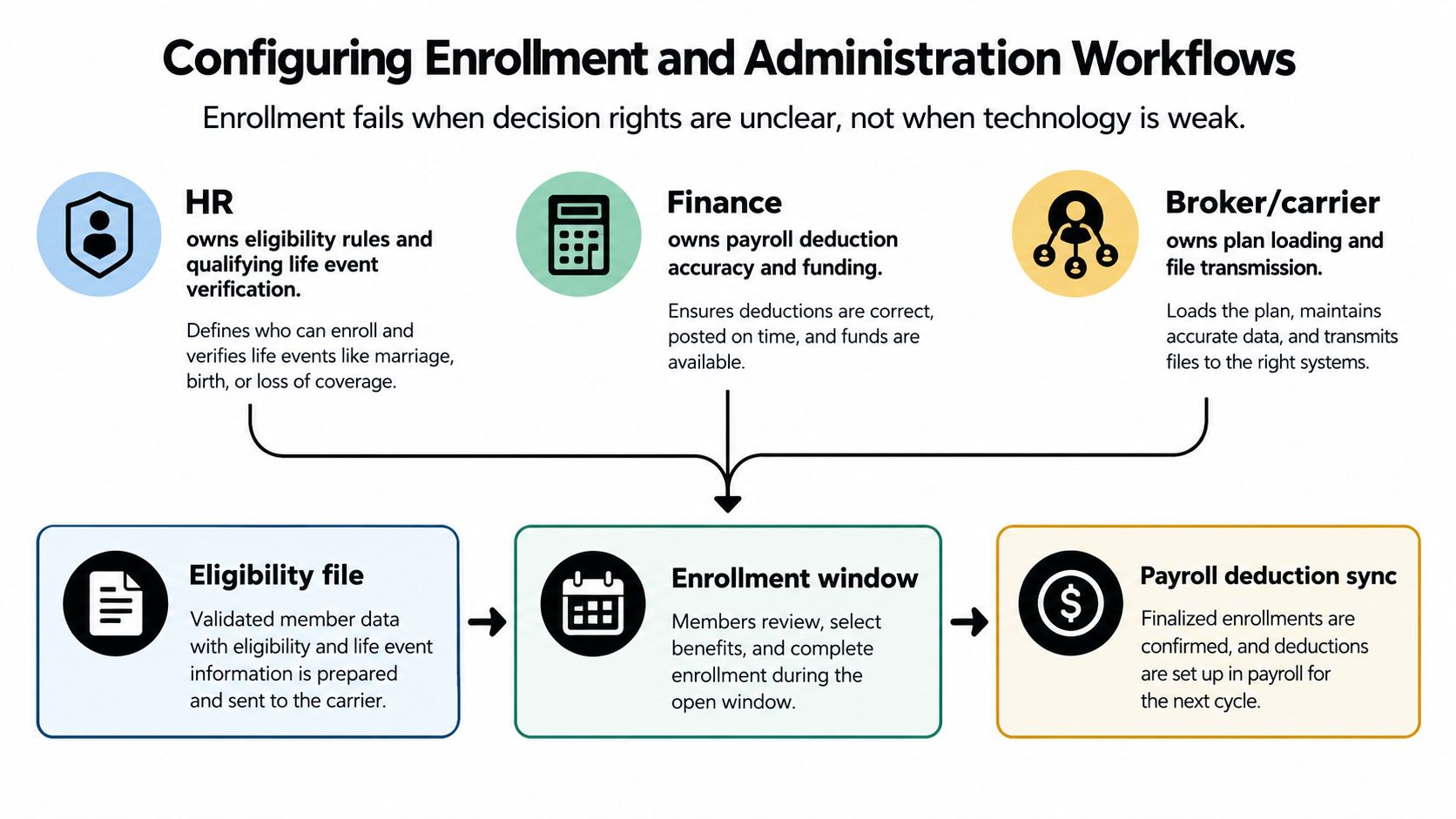
Enrollment breaks because ownership is fuzzy, not because software is bad. I've seen solid plan designs blow up because nobody knew who owned eligibility, who owned payroll deductions, and who was supposed to chase carrier file errors. That's not a benefits problem. That's a process problem.
Assign the work before you announce the window
HR owns eligibility rules and qualifying life event verification. Finance owns payroll deduction accuracy and funding. The broker or platform owns carrier file loading and transmission, and the carrier owns ID cards and claims administration. Put that in a shared document, and don't let it drift.
A short open enrollment window forces discipline. For smaller employers, the easiest path is a fixed window, a written default plan, and a clear communication calendar so passive enrollment is defensible and employees know what happens if they don't act. The point is speed with clarity, not speed with confusion.
The sequence matters. Weekly eligibility files catch new hires sooner than monthly updates. A 30, 60, 90-day dry run keeps the team from discovering broken feeds during open enrollment. Treat eligibility, payroll sync, and COBRA triggering as separate workstreams with named owners, not as one giant benefits bucket.
The platform choice should serve the workflow, not replace it. A tool like employee benefits enrollment software only works if the underlying roles and data handoffs are already clear.
Designing for Personalization Without Creating Chaos
More voluntary benefits do not automatically make a program better. They usually make it harder to reconcile, harder to explain, and harder to administer. That's the part most vendors skip when they sell “flexibility.”
Constrain the choices on purpose
The cleanest answer is a constrained choice architecture. Segment the workforce into two or three clear personas, then map benefits to those personas instead of opening every product to every employee. A young single employee does not need the same voluntary stack as a growing family, and a pre-retiree doesn't evaluate value the same way either.
If a voluntary product has weak uptake, cut it. If it hasn't earned its place in the program, it's just adding payroll feeds and support tickets. The goal is not maximum variety. The goal is visible value without open-enrollment chaos.
For teams thinking about engagement beyond benefits alone, the PSW Events engagement guide is a practical reference point for connecting employee experience work with broader retention efforts. That matters because benefits only land well when the communication around them is simple and consistent.
| Persona | Core Voluntary Stack | Admin Load Rating |
|---|---|---|
| Young singles | FSA, commuter support, limited lifestyle wallet | Low |
| Growing families | Dependent care, parental support, child-focused coverage add-ons | Moderate |
| Pre-retirees | Supplemental life, financial wellness tools, retirement education | Moderate |
The point is not to give everyone everything. The point is to give each segment a small set of benefits they'll really use, while keeping vendor sprawl under control. That's how you protect both employee experience and the HR team's sanity.
Compliance, Pitfalls, and Your Next-Step Checklist
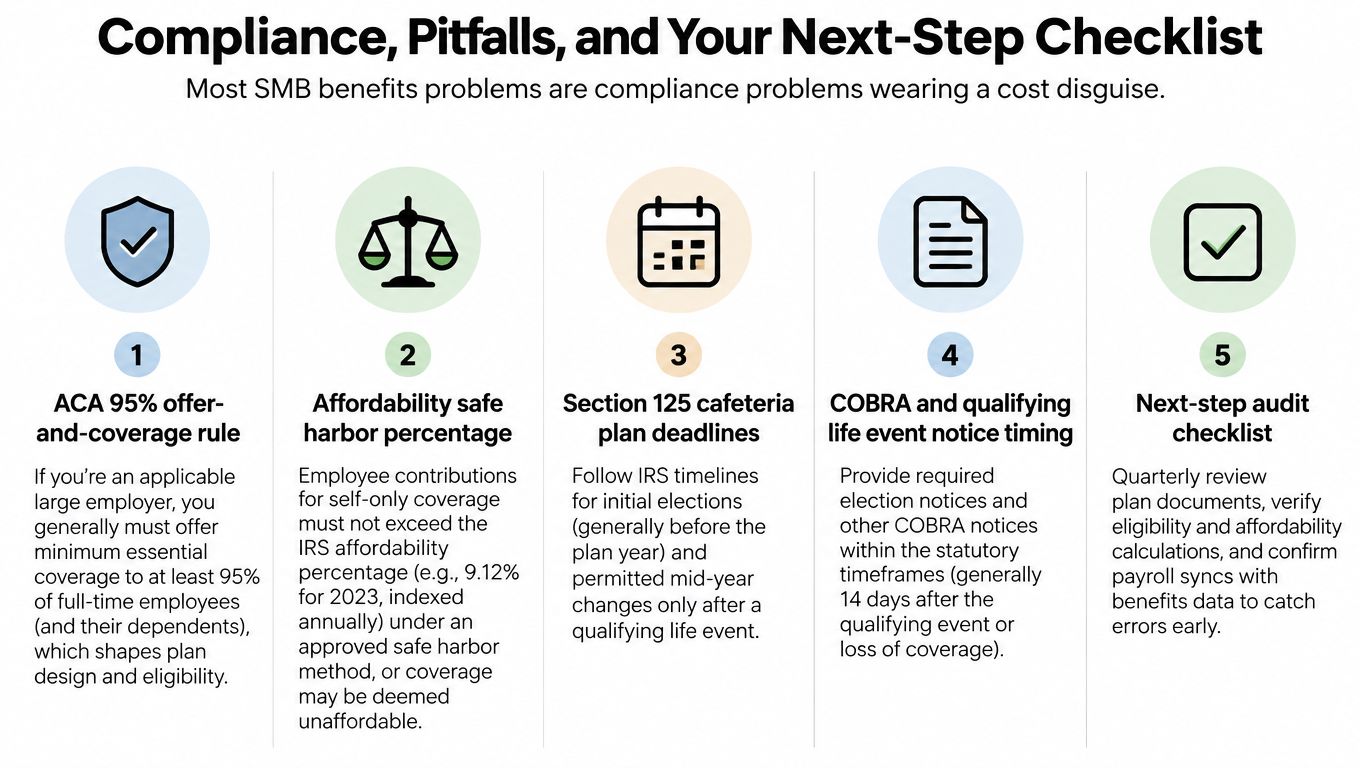
Most SMB benefits problems are compliance problems wearing a cost disguise. The budget issue gets all the attention, but the damage usually comes from missed thresholds, weak documentation, or bad timing. If your design can't survive a compliance review, it's not a design, it's a liability.
The rules that actually shape design
The ACA requires Applicable Large Employers to offer minimum essential coverage to at least 95% of full-time employees and their dependent children or face potential employer shared-responsibility penalties MetLife ACA overview. ERISA brings fiduciary basics and summary plan description discipline into the picture, and Section 125 requires cafeteria plan testing and election timing control. On top of that, state mandates keep expanding around paid leave, retirement auto-enrollment, and reproductive health coverage.
The recurring mistakes are brutally common. Companies misclassify 1099s and W-2s, miss the measurement period, or fail to refresh the SPD after a plan amendment. None of those errors look dramatic on day one. They become expensive later.
Bottom line: If the plan, the payroll file, and the legal documents don't match, the design isn't finished.
A 90-day action plan
- Days 1 to 30: Lock the budget, define the benefits philosophy, and map the current plan structure.
- Days 31 to 60: Benchmark carriers against the exact design, confirm compliance gaps, and clean up role ownership.
- Days 61 to 90: Finalize enrollment workflows, test payroll syncing, and refresh the employee communications package.
If you're tired of fighting the same benefits fires every renewal cycle, Benely helps companies design, compare, and administer benefits with a cleaner operating model. Visit Benely if you want a practical way to simplify plan design, enrollment, and compliance without layering on more chaos.