Late October arrives, the benefits file is still changing, and employees are already asking whether their doctors will remain in-network. HR is answering questions between payroll deadlines, finance is waiting for final rates, managers haven't been briefed, and the enrollment portal hasn't been tested with real employee scenarios. Then the company opens a two-week enrollment window and expects everyone to make careful decisions immediately.
That pattern isn't caused by a short window alone. It comes from treating open enrollment as a set of dates instead of an operating system with owners, dependencies, communication checkpoints, and live reporting. A well-designed open enrollment timeline moves the hardest work earlier, so the active election period becomes a focused decision sprint rather than an education campaign, troubleshooting desk, and compliance exercise happening at once.
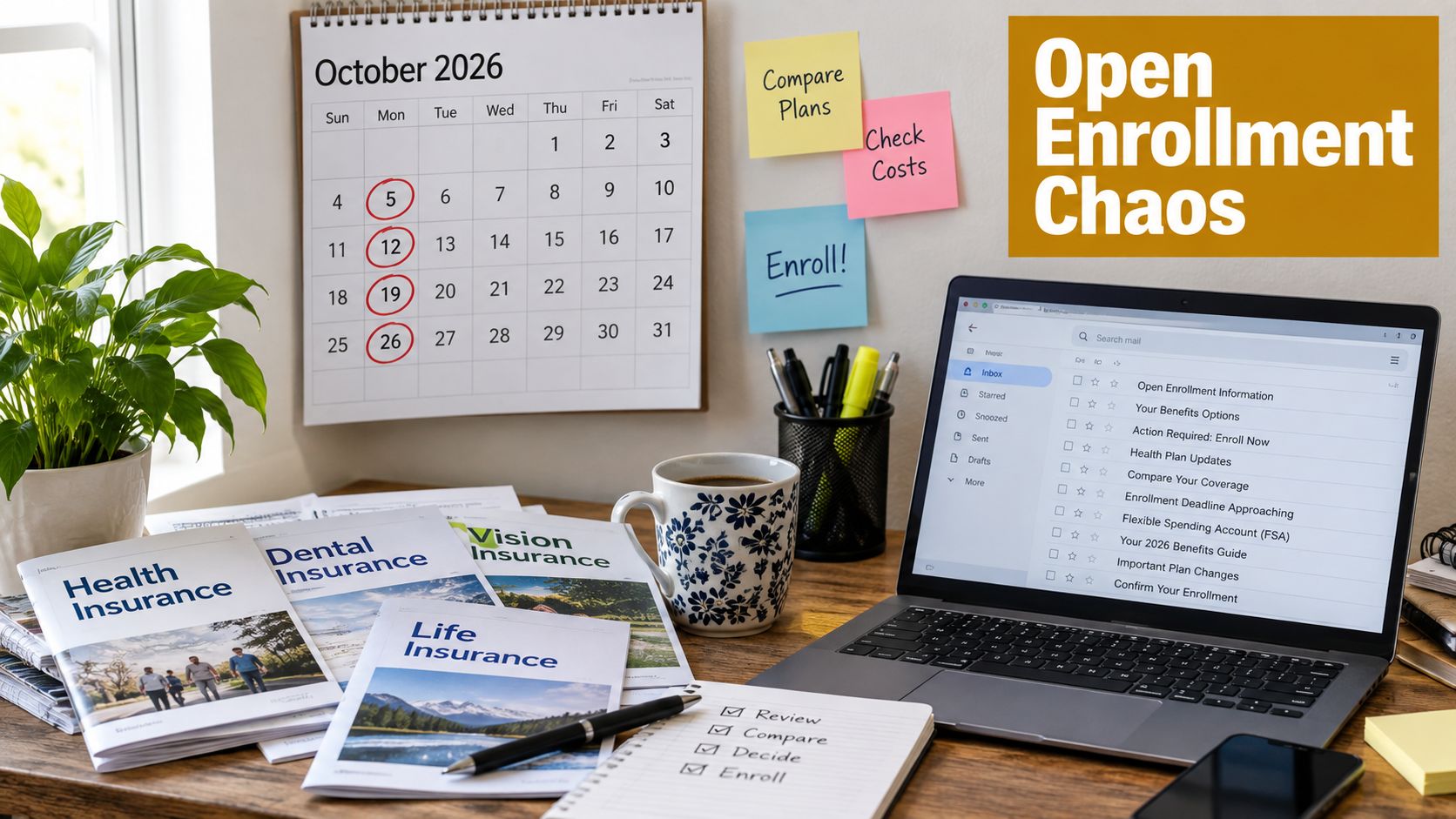
Table of Contents
- Why Your Open Enrollment Timeline Feels Chaotic Every Year
- Understanding Key Enrollment Windows and Coverage Dates
- Building Your Backward Planned Timeline Before Enrollment Opens
- Executing the Active Enrollment Window Without Losing Days
- Tracking Results and Fixing What Slowed You Down
- Your Compressed Timeline Checklist and Next Steps
Why Your Open Enrollment Timeline Feels Chaotic Every Year
Late October arrives with renewal details still changing. The benefits lead is reviewing plan designs, finance is waiting on rates, payroll needs contribution amounts, and employees are already asking whether their doctors remain in network. Then the company opens the portal and sends one broad announcement. Unfamiliar deductibles, network changes, and dependent questions reach HR at the same time, turning every unanswered question into a deadline-day escalation.
The short election window is rarely the main problem. Employees can make informed choices quickly when the context, tools, and support are ready before launch. Employer enrollment periods are concentrated in the fall, with 77% of responding organizations starting in October or November. The election period is often compressed, with 52% using two weeks and 41% using three- or four-week periods, according to the International Foundation of Employee Benefit Plans guidance on typical open enrollment timing. Those figures describe the employee-facing window, not the preparation required beforehand.
The window isn't the education period
Employees should not first learn about plan changes when elections open. Before launch, they need a plain-language summary of changes, a comparison of available options, instructions for adding or reviewing dependents, and a clear explanation of which benefits require an active election. Managers need a short response guide for common questions. HR needs an assigned route for issues involving eligibility, payroll deductions, or personal circumstances.
Passive communication creates avoidable follow-up. Enrollment findings referenced by LIMRA indicate that only about one in three eligible workers enroll in or change insurance benefits when offered an enrollment period. The practical response is to remove friction before launch, reinforce the deadline during the window, and identify incomplete actions early enough for HR to help.
Practical rule: The enrollment window should be the shortest part of the process, not the period in which the process begins.
Design the system around ownership
Start with the coverage-effective date and work backward. The benefits owner maintains the master schedule. The broker or benefits adviser confirms plan and carrier details. Finance approves the budget and employee contribution strategy. Payroll validates deductions. IT or the platform administrator tests workflows. Managers reinforce the message with their teams.
Each dependency needs an owner, a due date, and a visible status. A shared dashboard should track portal access, completed elections, incomplete enrollments, unanswered support requests, and when employees take action. Low activity may signal weak messaging or limited manager follow-up. High activity with low completion points more often to decision friction, confusing instructions, or a technical problem.
The communication cadence should match those signals. Send education before launch, provide reminders during the active period, and give managers a targeted list of actions to reinforce. That approach compresses cycle time from weeks into days without asking employees to decide faster than they can reasonably understand the choices. The work happens earlier, ownership is clear, and live evidence shows where intervention is needed before the deadline.
Understanding Key Enrollment Windows and Coverage Dates
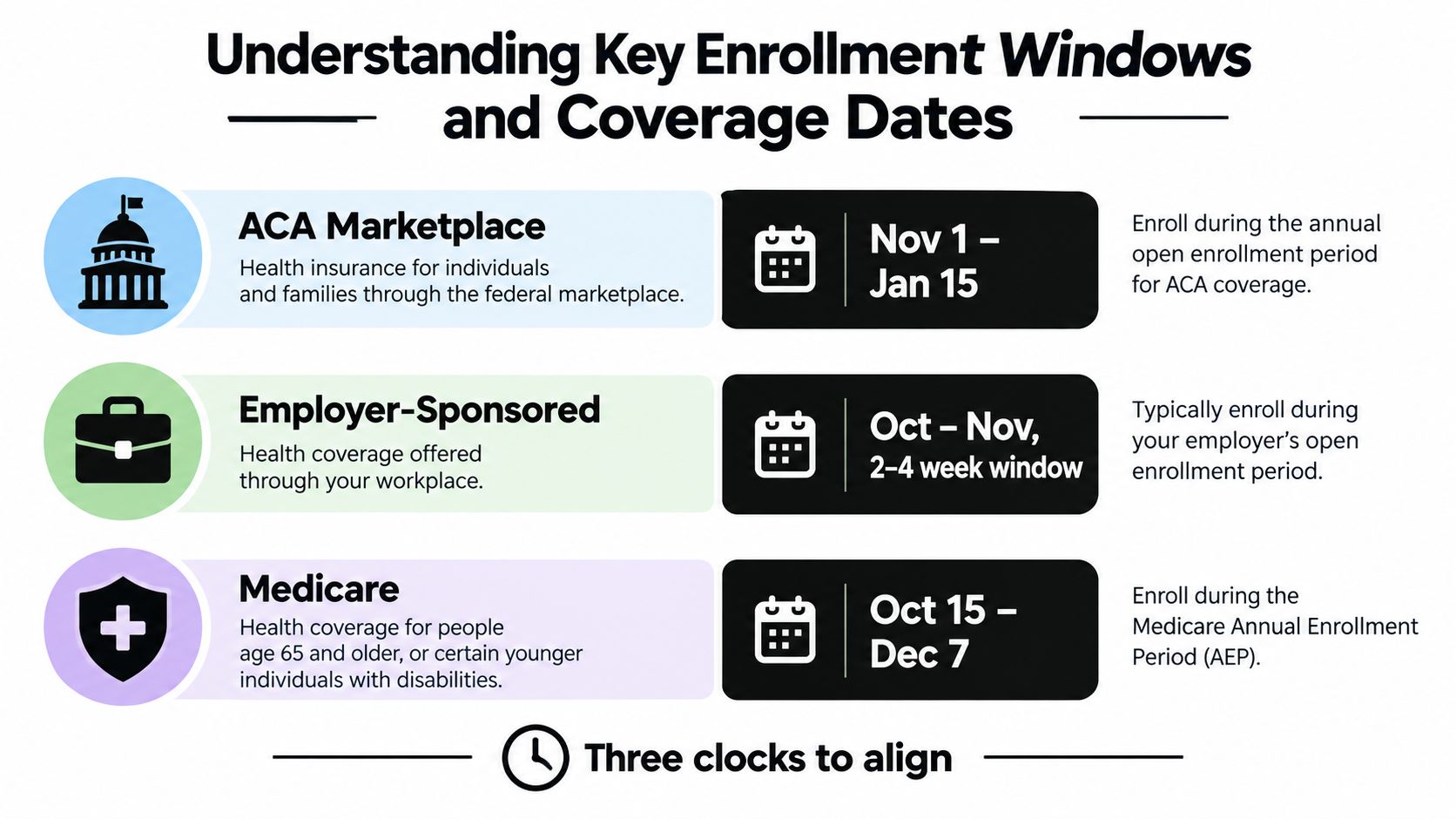
An enrollment plan fails quickly when the team chooses a launch date before identifying which clock applies. ACA Marketplace coverage, employer-sponsored benefits, and Medicare follow different schedules, so separate the external deadlines employees may face from the internal dates HR can control. That distinction determines which deadline belongs on the dashboard and which belongs in employee communications.
For 2026 ACA Marketplace coverage, enrollment ran from November 1, 2025, through January 15, 2026. Enrolling by December 15 generally supported coverage beginning January 1, while later enrollment generally moved the effective date to February 1, according to the HealthCare.gov dates and deadlines guide. The effective date affects employees coordinating a job change, payroll deductions, a family budget, or the end of another plan.
State-based Marketplaces may use different deadlines. For 2026, California, New Jersey, New York, Rhode Island, and Washington, DC continued enrollment through January 31. HR should not publish one national date when employees live in several states. Identify each employee's applicable Marketplace and direct them to the relevant exchange information. Assign that review to a named owner before communications are approved.
Three clocks to align
Employer-sponsored enrollment is usually an internal fall process. The company sets its election window, but a calendar-year plan commonly requires fall elections for January coverage. The effective date remains the anchor, even when HR chooses the employee-facing deadline.
Medicare has its own annual period, from October 15 through December 7, and changes made during that window take effect on January 1 of the next year, according to Medicare.gov's open enrollment information. Employees comparing employer coverage with Medicare need clear guidance about which deadline applies to each decision. Combining the schedules in one message creates avoidable questions and slows completion.
Start with the effective date
Build the operational sequence in this order:
- Confirm the coverage-effective date. It drives payroll, carrier files, employee notices, and reconciliation.
- Set the final election deadline. Reserve time for carrier transmission, eligibility validation, and correction of obvious data errors.
- Schedule testing before launch. Verify plan rules, dependent fields, waiver choices, payroll deductions, and confirmation notices.
- Place employee education before the election window. Employees need time to understand plan changes before they must act.
- Publish state-specific guidance where needed. A federal deadline should not obscure a different state Marketplace schedule.
For employees asking what open enrollment means in practical terms, the benefits open enrollment explanation from Benely offers a plain-language companion to internal instructions. The planning rule is straightforward: work backward from when coverage must begin, then place every communication and validation task before the final election date. Track those milestones by owner, status, and exception so the active window is used for decisions, not preventable corrections.
Building Your Backward Planned Timeline Before Enrollment Opens
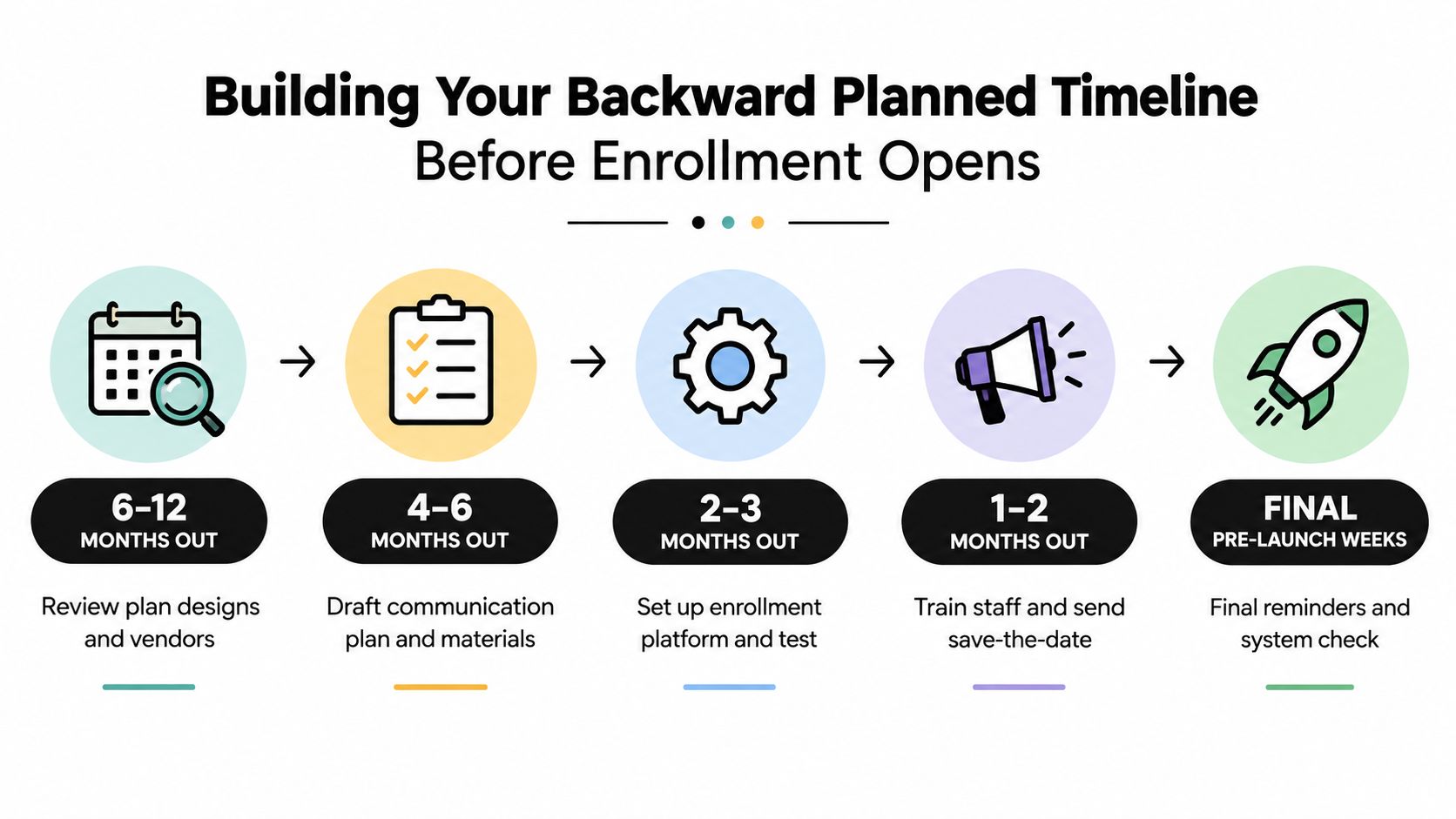
A workback plan prevents the fall rush from becoming a series of late approvals and rushed corrections. Start with the coverage-effective date, then assign each decision, review, communication, and test to an owner. The International Foundation of Employee Benefit Plans methodology supports this backward-planning approach, with education and communication beginning well before employees make elections. The exact schedule depends on the renewal date, plan complexity, and team size, but the ownership logic remains consistent.
Six to twelve months out
The benefits lead should review the previous cycle while details remain fresh. Pull participation results, incomplete elections, employee questions, payroll corrections, carrier issues, and survey feedback. These findings should become work items with owners, deadlines, and a measure of completion, rather than notes that disappear into an annual file.
Finance sets budget boundaries and employee contribution assumptions. The broker or benefits adviser compares renewal terms, alternative plan designs, network considerations, and carrier options. HR confirms whether the company plans to change eligibility rules, add voluntary benefits, revise contribution tiers, or evaluate another administrative platform.
This stage also provides a practical point to assess outside support. Benely's platform allows teams to compare health plans from carriers such as Aetna, Kaiser, Anthem, Blue Shield, and UnitedHealthcare, set budgets, automate enrollment setup, and connect benefits work with payroll and onboarding workflows. Teams can use Benely for plan benchmarking and health plan shopping when finance or HR lacks enough visibility into the current arrangement.
Four to six months out
Once plan direction is clear, assign deliverables instead of vague responsibilities. The benefits lead owns the employee experience and compliance calendar. Finance approves cost assumptions. The broker supplies accurate plan summaries and carrier materials. Payroll validates deduction logic. Managers receive a concise briefing and a defined route for escalating questions.
Build the communication package at this point:
- Plan comparison: Explain premiums, deductibles, networks, prescription considerations, and contribution changes in language employees can use.
- Decision guide: State what employees must actively elect, what may carry forward, and what happens if they waive coverage.
- Question path: Separate general plan questions from private eligibility or family-status matters.
- Manager toolkit: Provide talking points, dates, office-hour details, and instructions for directing employees to HR.
- Calendar invites: Schedule education sessions and enrollment milestones before competing priorities fill calendars.
For distributed teams, calendar coordination needs a named owner. If HR, managers, payroll, and brokers maintain separate schedules, use a shared planning method such as sync accounts with SyncThemCalendars. Keep launch dates, office hours, testing windows, and approval checkpoints visible in one operating view.
Two to three months out and the final weeks
The platform administrator configures plan rules, eligibility groups, dependent workflows, waiver options, and confirmation messages. Test representative employee scenarios, including a new hire, a family adding a dependent, a person waiving coverage, and an employee moving between eligibility classes. Payroll compares expected deductions with the enrollment configuration before employees access the portal.
At one to two months out, send the save-the-date and begin manager training. In the final pre-launch weeks, complete the system check, confirm carrier materials, freeze approved plan details, and prepare a support queue. A simple dashboard should show configuration status, unresolved questions, testing completion, communication delivery, and approval owners. That visibility lets HR resolve blockers before they consume the active enrollment window.
Executing the Active Enrollment Window Without Losing Days
A compressed election period needs a visible rhythm. Employees should know what action is expected, managers should know when to reinforce it, and HR should know which dashboard signal triggers intervention. The mistake is sending one launch email and one final reminder, then treating silence as completion.
A practical cadence for two to four weeks
Use the first days to open access and establish the expected action. The launch message should contain the deadline, the portal link, a short explanation of what changed, and a direct statement about whether employees must actively confirm elections.
During the middle of the window, target support instead of repeating the same broadcast. Hold a live question-and-answer session, publish an updated FAQ, and ask managers to remind employees during existing team meetings. Employees who opened the portal but didn't finish need a different message from employees who haven't logged in.
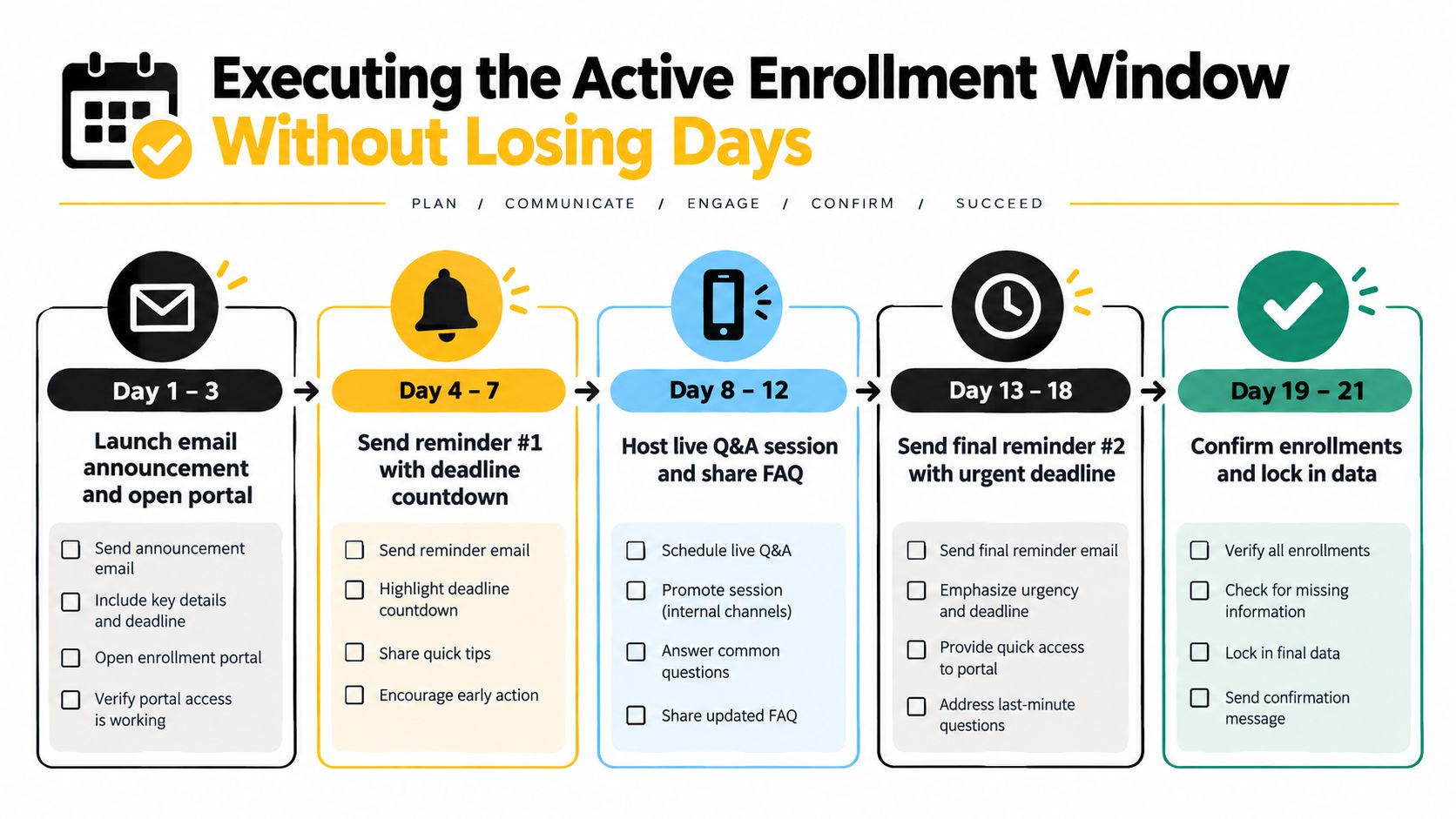
A workable cadence looks like this:
- Days 1–3: Open the portal, send the launch announcement, and confirm that employees can access the correct plan choices.
- Days 4–7: Send the first reminder with a clear deadline countdown. Review activity by department, eligibility group, and completion status.
- Days 8–12: Host live office hours or a Q&A session. Share answers to recurring questions without exposing individual employee information.
- Days 13–18: Send a final substantive reminder, emphasize the consequences of missing the deadline, and contact incomplete enrollees through the channels they use.
- Days 19–21: Confirm elections, resolve flagged exceptions, lock approved data, and begin reconciliation with payroll and carriers.
Intervene based on behavior
Suppose portal access is strong but completed elections remain low. That usually points to decision friction. Employees may be comparing unfamiliar plans, searching for provider information, or stopping at a dependent question. HR should simplify the comparison and offer a short appointment or office hour rather than sending another long announcement.
If one department is lagging while others are progressing, ask its manager to reinforce the deadline directly. If a specific employee reports a marriage, birth, loss of coverage, or another possible qualifying event, route the case through the appropriate eligibility process. Don't extend the entire company timeline because one case needs separate review.
A connected platform can help HR see enrollment progress alongside onboarding and payroll context. Employee benefits enrollment software from Benely is one example of a system designed to support plan comparisons, enrollment tracking, and benefits administration in a centralized workflow.
The operational test: Every reminder should answer three questions, what must I do, by when, and where do I get help?
Tracking Results and Fixing What Slowed You Down
The dashboard isn't a report you open after enrollment closes. It is the control panel for the active window. A benefits lead should review it frequently enough to spot stalled departments, incomplete elections, repeated questions, and unusual timing patterns while intervention can still change the outcome.
The scale of Marketplace activity shows why disciplined operations matter. The Centers for Medicare & Medicaid Services reported that 23.0 million consumers had signed up for 2026 individual market coverage since open enrollment began on November 1, 2025, across 30 states using HealthCare.gov and 21 State-based Exchanges, as reported in the CMS 2026 Marketplace national snapshot. An employer's process is smaller, but the same principle applies: high-volume decisions need clear status visibility and reliable handoffs.
Open Enrollment Performance Dashboard
| KPI | What It Tells You | Action If Lagging |
|---|---|---|
| Participation rate | Whether eligible employees are taking action | Ask managers to reinforce the deadline and check whether the launch message clearly states the required action |
| Incomplete enrollments | Where employees are stopping in the workflow | Review the blocked step, offer office hours, and resolve confusing fields or documentation requests |
| Timing of employee actions | Whether activity is spread across the window or concentrated near the end | Move education earlier and increase targeted reminders before the final days |
| Event attendance | Whether employees are using available education | Change the session time, record the explanation, and address the questions employees actually ask |
| Post-enrollment survey feedback | Which parts of the experience created confusion | Assign an owner to each recurring issue and update the guide before the next cycle |
The participation rate needs context. A low figure can reflect weak communication, inaccessible tools, unclear eligibility, or employees who already understand their elections and don't need to change them. Pair it with portal activity and incomplete-enrollment data before deciding what failed.
Run a short retro while the evidence is fresh
Within the post-enrollment reconciliation period, hold a focused review with HR, payroll, finance, the broker, and the platform administrator. Identify the first point where work slowed, the question that appeared repeatedly, the report that arrived too late, and the correction that required manual effort.
Record the decision in the next workback plan. If employees waited until the final days, move education earlier. If payroll corrections dominated the closeout, add an earlier file validation. If managers didn't reinforce the message, make that responsibility explicit and schedule it on their calendars. The objective isn't to create more meetings. It's to shorten the next cycle by fixing the dependency that consumed the most time.
Your Compressed Timeline Checklist and Next Steps
A strong open enrollment timeline fits on one page. The operating detail belongs in assigned owners, tested workflows, dashboard signals, and scheduled communications. Start with the coverage-effective date, work backward to the employee deadline, then place every approval, education session, test, reminder, and reconciliation task before it.
Use this checklist to run the next cycle:
- Anchor the calendar: Confirm the coverage-effective date and the applicable Marketplace, employer, or Medicare window.
- Assign owners: Name one accountable person for plan design, budget approval, broker coordination, payroll validation, platform setup, communications, manager reinforcement, and final reconciliation.
- Build early: Reserve the education runway and high-level communication phase defined in the workback model.
- Prepare decisions: Complete plan comparisons, contribution explanations, dependent instructions, waiver guidance, and FAQs before the portal opens.
- Test the workflow: Use realistic employee scenarios to verify eligibility, payroll deductions, confirmation messages, and carrier data.
- Run the cadence: Schedule launch messages, targeted reminders, manager reinforcement, office hours, and final support before the active window begins.
- Watch the funnel: Review participation, incomplete elections, employee timing, event attendance, and feedback while enrollment remains open.
- Close the loop: Reconcile elections with payroll and carriers, document exceptions, survey employees, and turn findings into the next workback plan.
Use this open enrollment checklist for HR to organize ownership and expose missing steps. Rate the process from plan selection through employee support and reconciliation. The result should show whether the delay came from communication, ownership, technology, or plan complexity.
Benely provides a free 30-page guide, certified HR specialists, centralized benefits administration, and PEO shopping for organizations evaluating a co-employment model. Its platform also supports plan benchmarking, enrollment automation, payroll and onboarding connectivity, and progress tracking. Confirm public deadlines through HealthCare.gov's official dates and Medicare.gov's enrollment guidance before publishing employee communications.
Open last year's calendar and mark every task that arrived late. Assign each to a named owner, move education ahead of launch, and define the dashboard signal that triggers help. A compressed window works when decisions, reminders, and exception handling are prepared before employees enter the portal.
Benely helps employers compare health plans, set benefits budgets, automate enrollments, and track open enrollment progress through a centralized platform supported by certified HR specialists. Visit Benely to benchmark the current program, access planning resources, and build a faster enrollment cycle.