 Employee Benefits
 HR & Compliance
 Technology
 Wellness
 PEO Solutions
Open enrollment means a defined, time-limited annual window when eligible employees can enroll in, renew, or change health coverage for the upcoming plan year, typically without needing a qualifying life event. For federal Marketplace coverage, the standard window has typically run from November 1 through January 15, though dates can vary by state and year.
You might be the office manager who just inherited benefits administration, with carrier emails in your inbox and employees asking whether they need to do anything. Meanwhile, your founder wants a budget forecast, payroll needs deduction amounts, and someone has just asked whether their new spouse can join the plan.
The manageable way to approach this is to connect the calendar, the coverage decision, and the administrative follow-through. Open enrollment is a budgeting and risk-management decision, supported by a process that gets each employee's choice into the right systems before coverage begins.
Table of Contents
- What Open Enrollment Means in Plain English
- How Annual Timelines Actually Work
- Who Is Eligible and Who Actually Enrolls
- Why the Cheapest Premium Is Rarely the Cheapest Plan
- Qualifying Events and the Second Route Into Coverage
- An SMB Open Enrollment Workflow That Actually Finishes
- Tips for Employers and Employees During Open Enrollment
What Open Enrollment Means in Plain English
Your calendar says benefits enrollment is approaching, but the reminders don't explain what employees are deciding. Some are choosing coverage for the first time. Others already have insurance and assume there's nothing to review.
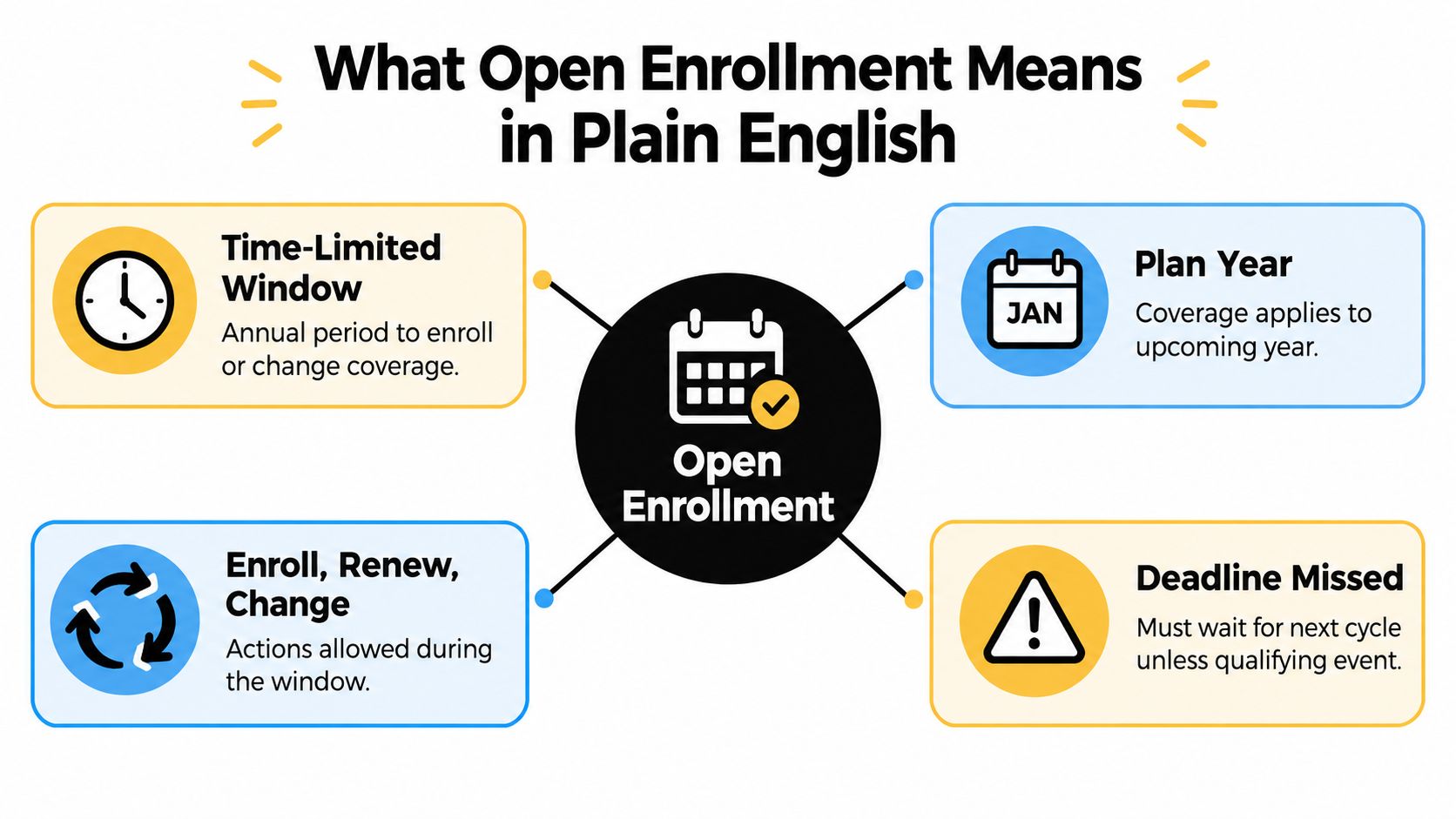
The plain-language definition is straightforward: eligible people get a designated period to select, renew, or change health coverage for the upcoming plan year. The HealthCare.gov enrollment guide describes this annual opportunity and distinguishes it from enrollment outside the regular window.
The important word is upcoming. Employees aren't merely updating a form about today's insurance. They're making a decision about coverage and household spending for the next coverage period.
What employees are choosing
An employee's decision usually falls into one of these categories:
- Enroll: Select available coverage after confirming eligibility.
- Renew: Continue coverage after reviewing the upcoming plan's terms and the employer's renewal process.
- Change: Choose another available plan or revise covered family members as permitted.
- Waive: Decline the employer's coverage and record that decision rather than leave an unfinished election.
Consider an employee who enrolled previously and now expects regular specialist appointments. Keeping the same plan might still make sense, but only after checking whether it fits those needs. Renewal deserves attention even when the employee doesn't intend to switch.
Why employers need a recurring process
For an HR lead, the annual window creates a shared checkpoint for reviewing employee choices and preparing accurate records. For employees, it's a chance to reconsider whether their coverage still fits their household. For founders and COOs, it's a budget decision involving both employer spending and employees' ability to afford care.
Fast-growing companies also need a process that doesn't depend on a single person remembering every exception. A repeatable calendar, clear ownership, and documented decisions make the work easier to hand off.
Practical rule: Treat a completed enrollment form as a recorded decision, not proof that the employee understood the decision.
A useful explanation to give a colleague is simple: open enrollment is the annual chance to review benefits for the next plan year, with a deadline for making and submitting choices.
How Annual Timelines Actually Work
The question “When is open enrollment?” needs a follow-up: Which coverage are you choosing? An employer's benefits schedule and the individual Marketplace calendar aren't interchangeable.
For federal Marketplace coverage, the standard enrollment window runs from November 1 through January 15. Enrollment by December 15 generally supports January 1 coverage, while enrollment between December 16 and January 15 generally supports February 1 coverage, according to HealthCare.gov's guidance on moving from job-based coverage to a Marketplace plan.
Check the applicable state and enrollment year before publishing those dates. Do not copy the federal calendar into your company's benefits announcement unless it applies to the coverage being discussed.
Annual Open Enrollment Deadlines at a Glance
| Coverage Path | Enrollment Window | Effective Date |
|---|---|---|
| Federal Marketplace, earlier selection | Earlier portion of the standard annual window | Generally the start of the upcoming calendar year |
| Federal Marketplace, later selection | Later portion of the standard annual window | Generally the following month |
| Employer-sponsored benefits | Employer's published enrollment period | Employer plan's confirmed coverage start |
| Newly hired employee | Applicable initial eligibility and enrollment window | Determined by the employer plan's terms |
The table's distinction matters more than memorizing a universal date. An employee who sees Marketplace advertisements may mistakenly assume they have until that deadline to submit workplace elections.
Separate the election deadline from the coverage start
For cafeteria-plan benefits, employees generally make elections before the plan year begins and can't freely change them during the coverage period. IRS guidance on cafeteria-plan election changes explains that permitted midyear changes depend on the written plan terms and an applicable qualifying event.
That means your communication should identify the election deadline, plan year, and coverage effective date separately. “Benefits are due soon” doesn't tell an employee when the new deduction begins or whether current coverage continues.
Build your internal deadline ahead of the carrier's deadline. That buffer gives your team time to collect missing elections, validate dependent information, resolve discrepancies, and submit enrollment data.
Payroll also needs confirmed deduction amounts and start dates. A submitted employee election isn't the same thing as a carrier-confirmed enrollment or a correctly configured payroll deduction.
For a new hire, ask the plan administrator about initial eligibility, any applicable waiting period, the election deadline, and the effective date. Don't tell someone to wait for annual open enrollment without checking the separate new-hire pathway.
Who Is Eligible and Who Actually Enrolls
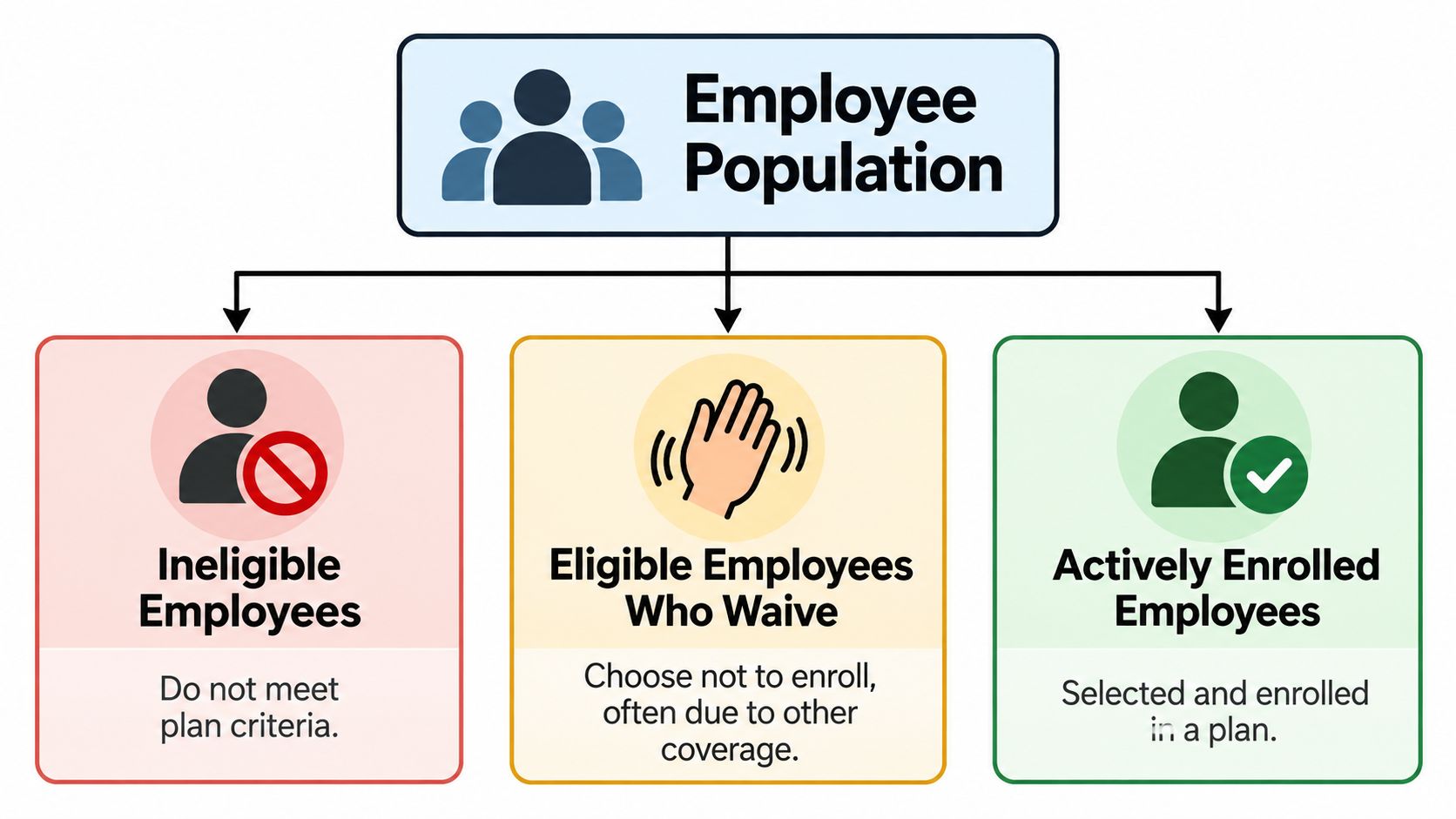
An employee roster isn't an enrollment roster. Some workers won't meet the plan's eligibility criteria, some eligible workers will decline coverage, and others will enroll themselves or their families.
Among small firms offering health benefits, 82% of employees were eligible to enroll in 2023, according to KFF's 2023 Employer Health Benefits Survey. That's an eligibility measure, not a statement that every eligible employee selected the employer's plan.
Confusing those populations makes budget forecasts and follow-up lists less useful. An employee with a documented waiver shouldn't appear in the same unresolved category as someone who hasn't responded.
Keep eligibility and participation separate
Your records should distinguish:
- Ineligible employees: Record the applicable plan criteria and the reason the employee isn't currently eligible.
- Eligible employees who waive: Capture the election and appropriate waiver documentation. They may have coverage through a spouse, Medicaid, the Marketplace, or another source.
- Actively enrolled employees: Record the selected plan, coverage tier, dependents, effective date, and confirmation status.
Part-time status deserves a deliberate review rather than an assumption. Use the plan documents and administrator guidance, supported by a plain-language resource on part-time employee eligibility for health insurance, to frame the questions you need answered.
Understand the employee's share of the budget
Covered workers paid an average of 16% of premiums for single coverage and 26% for family coverage in 2025; family-coverage contributions averaged 36% at firms with 10 to 199 employees, compared with 23% at larger firms, according to KFF's 2025 Employer Health Benefits Survey.
Those figures aren't a prediction of your company's costs. They show why an employee's contribution deserves prominent placement in enrollment materials, especially when dependent coverage is involved.
Present the actual employee payroll deduction for each available coverage tier. Showing only the employer's contribution leaves employees without the information they need to judge affordability.
For budget planning, keep eligibility, participation, and coverage tiers visible as separate fields. A family election and an employee-only election shouldn't be treated as interchangeable assumptions, and an unresolved election shouldn't become a waiver.
Why the Cheapest Premium Is Rarely the Cheapest Plan
The lowest payroll deduction is easy to spot. Whether that plan offers the lowest total cost is harder to determine, and the answer depends on the household's healthcare needs and ability to handle unexpected bills.
A 2025 employee-benefits survey found that only 3 in 10 employees said they understood their benefits perfectly, 35% regretted a benefits choice after enrollment, and more than half would struggle to cover an unexpected $1,000 medical expense, according to the Selerix Employee Benefits Survey Report.
The practical lesson isn't that employees should always buy richer coverage. It's that a smaller deduction can conceal a difficult cash-flow trade-off.

Compare a year of costs, not a paycheck
Use this planning framework:
Estimated annual household cost = annual employee premiums + expected medical and prescription spending under the plan.
This is a comparison tool, not a guarantee. Employees should also examine the plan's stated out-of-pocket maximum and the expenses that don't count toward it.
Help employees compare these components:
- Deductible: What would they need to pay before applicable plan payments begin?
- Copayments and coinsurance: How would the plan divide costs for the services they expect to use?
- Prescription coverage: Are their medications covered, and what cost-sharing applies?
- Provider network: Are their preferred doctors, hospitals, and specialists included?
- Out-of-pocket maximum: What limit applies, and which expenses fall outside it?
Don't add every deductible, copayment, and maximum together. Use the plan's rules to estimate how spending accumulates, without counting the same expense twice.
Test realistic household scenarios
For a hypothetical employee expecting little care, a lower-premium option may fit well. But they should still consider whether they could manage a larger bill if their expectations change.
For someone managing an ongoing condition, compare recurring appointments and prescriptions using the actual plan documents. A higher-premium option may provide more manageable costs when care is used, but it isn't automatically cheaper.
A household anticipating substantial treatment should examine total exposure and provider access, not just routine office-visit costs. Timing matters too: a bill arriving early in the year may be difficult even when the annual budget looks workable.
Use a PPO and HDHP comparison to help employees ask better questions, not to choose solely by plan label. The useful question is: Which available plan fits both my expected care and my ability to absorb an unexpected expense?
Qualifying Events and the Second Route Into Coverage
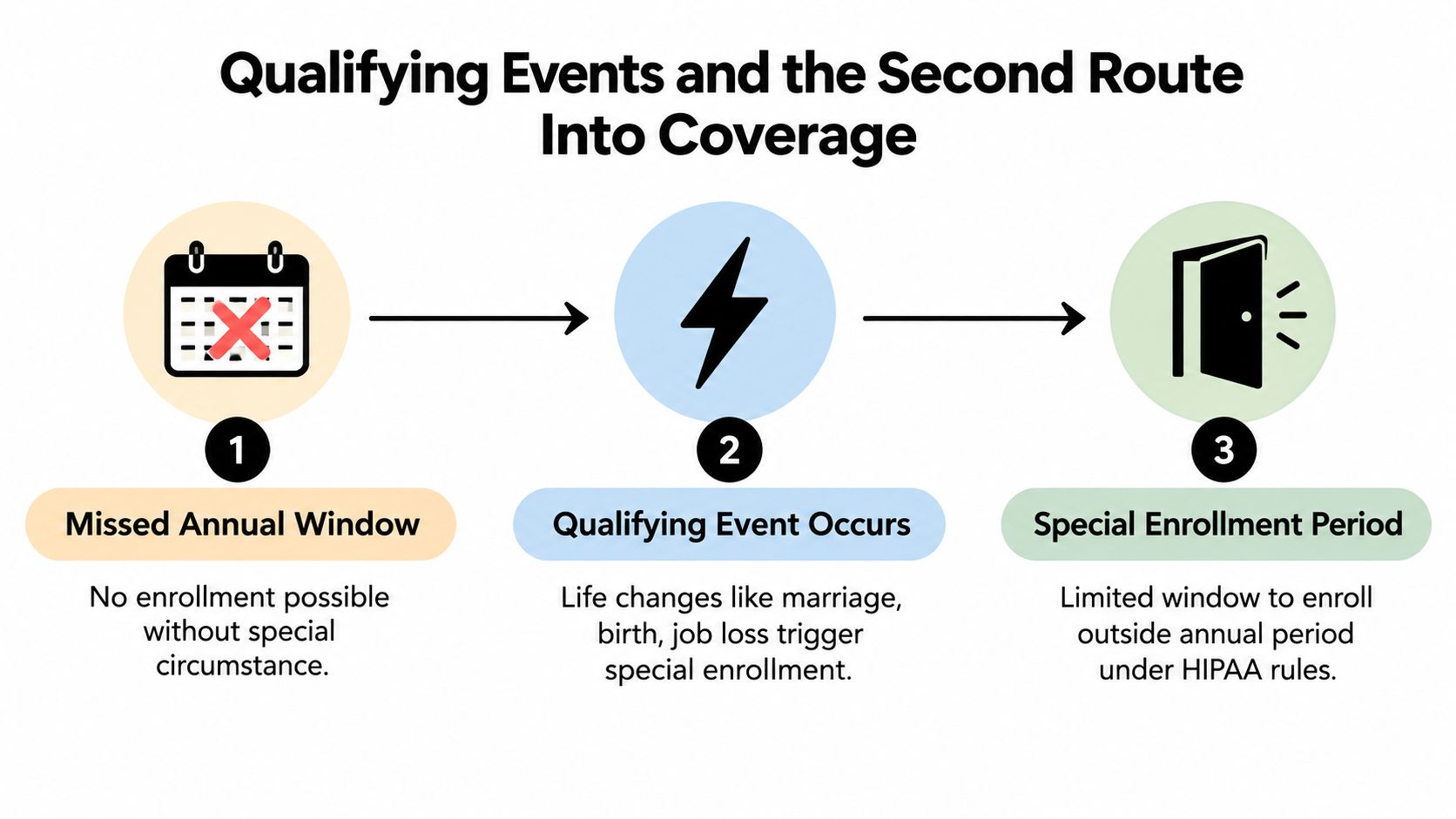
An employee misses the deadline and asks whether they can still join the plan. Another gets married after enrollment closes. Those situations may lead to different answers, so don't treat every late request as either automatically acceptable or permanently impossible.
Special enrollment provides an event-driven route into coverage outside the annual window. The event, applicable coverage system, request deadline, and eligibility evidence all matter.
Under HIPAA employer-plan rules, eligible employees or dependents may generally request special enrollment within 30 days after applicable loss of other coverage, marriage, birth, adoption, or placement for adoption; Medicaid or CHIP coverage termination or eligibility for premium assistance can create a 60-day window, as explained in the Department of Labor's HIPAA special-enrollment fact sheet.
Identify the coverage system first
Employer-plan rights and Marketplace Special Enrollment Periods aren't identical. Qualifying Marketplace events can include marriage, having or adopting a child, losing coverage, and certain moves, with eligibility conditions and documentation requirements described in Get Covered Illinois's qualifying-life-event guidance.
A move therefore shouldn't automatically be processed as an employer-plan HIPAA special-enrollment event. Establish which coverage the employee wants and which rules apply.
Likewise, a change in family circumstances doesn't mean every possible benefits election can be changed. Review the applicable plan terms and event requirements before promising an outcome.
Turn the request into a documented process
When an employee contacts HR, collect the facts promptly:
- Identify the event: Ask what changed and which employee or dependents need coverage.
- Record the dates: Capture both the event date and the date the employee requested enrollment.
- Confirm the evidence: Ask the administrator what documentation is needed. Depending on the event, that might involve proof of marriage, birth, adoption, or lost coverage.
- Verify the outcome: Confirm the permitted election, effective date, carrier processing, and payroll adjustment.
For example, an employee who loses coverage through a spouse needs more than an assurance that HR will “take care of it.” They need the applicable request deadline, required documents, and confirmation of when replacement coverage begins.
A life event starts an eligibility review. It doesn't make an unsubmitted enrollment request complete.
If someone missed annual enrollment without an applicable exception, explain the limitation clearly and check the available options with the administrator. Don't promise a retroactive fix or assume that an administrator can waive the rules.
An SMB Open Enrollment Workflow That Actually Finishes
A workable enrollment cycle starts before employees receive the announcement. The HR lead confirms the available plans, the employer's budget, the coverage tiers, and the calendar with the broker or administrator.
This isn't only a first-time enrollment exercise. For plan year 2024, 21,310,538 people selected Marketplace coverage, including 5,045,290 new consumers and 16,265,248 returning consumers, according to CMS's national Marketplace enrollment results. Those are Marketplace figures, not employer-plan participation figures, but they illustrate the recurring workload of reviewing and renewing coverage.
Before employees make elections
Start with a budget-first comparison of available options. Benely is one option alongside broker-assisted and administrator-managed processes: its centralized platform supports comparing more than 4,000 health plans, setting budgets, automating enrollment, and tracking progress in days rather than weeks, supported by connected payroll tools and certified HR specialists; its open enrollment checklist for HR provides a practical planning resource.
Use those capabilities to assign ownership, not to assume that technology removes the need for review. Someone still needs to approve plan choices, confirm eligibility rules, and decide which unresolved records require follow-up.
Then prepare employee communications with the actual contribution amounts, plan documents, submission instructions, and a named contact for questions. Provide a way to compare costs privately without asking employees to disclose personal medical details to managers.
From submission to confirmation
Run the remaining work in chronological order:
- Collect decisions: Track submitted elections, documented waivers, and outstanding responses separately.
- Validate records: Check dependent details, missing information, duplicate records, and effective dates before transmission.
- Send enrollment data: Submit through the approved carrier or administrator process and investigate rejected records.
- Reconcile payroll: Compare deductions against confirmed elections, coverage tiers, and start dates.
- Audit completion: Confirm carrier acceptance and give employees a clear route to report discrepancies.
Progress tracking is useful only when the status has meaning. “Submitted” should remain distinct from “validated” and “confirmed.”
After coverage begins, compare the enrollment roster, carrier records, and payroll deductions. Keep event-driven requests in the same controlled environment, with their own deadlines and supporting records, so annual enrollment doesn't become the only time benefits data gets attention.
Tips for Employers and Employees During Open Enrollment
Use a short action list that employees and administrators can share without needing to interpret insurance jargon.
For employers
- Confirm the calendar: Publish the plan year, internal deadline, and coverage start.
- Clean the records: Validate eligibility, dependents, and waivers.
- Explain the costs: Show employee contributions and support total-cost comparisons.
- Prepare managers: Give them approved answers and an escalation contact.
- Track completion centrally: Separate unresolved decisions from confirmed enrollments.
For employees
- Review current coverage: Check changes rather than relying on last year's selection.
- List expected care: Include appointments, medications, and anticipated treatment.
- Compare scenarios: Consider both expected spending and an unexpected medical need.
- Verify details: Check networks, formularies, any HSA or FSA interactions, and beneficiary information where applicable.
- Save confirmation: Retain the election record and check the resulting deductions.
Do returning employees need to review their plans? Yes. Marketplace data shows that roughly three-quarters of participants were returning consumers, reinforcing the importance of reassessment rather than treating renewal as a first-time-only task, as reflected in CMS's Marketplace enrollment reporting.
Ask your benefits partner: Can we show that employees understood their options and that their choices reached coverage and payroll correctly?
Benely offers benefits brokerage, centralized enrollment tools, connected payroll, and HR specialist support to help employers manage both annual elections and ongoing benefits administration. Visit Benely to rate your current enrollment process and ask about benchmarking your benefits program against your budget and workforce needs.